Free Invoice Generator for Small Businesses in the USA: How to Create a Professional Invoice
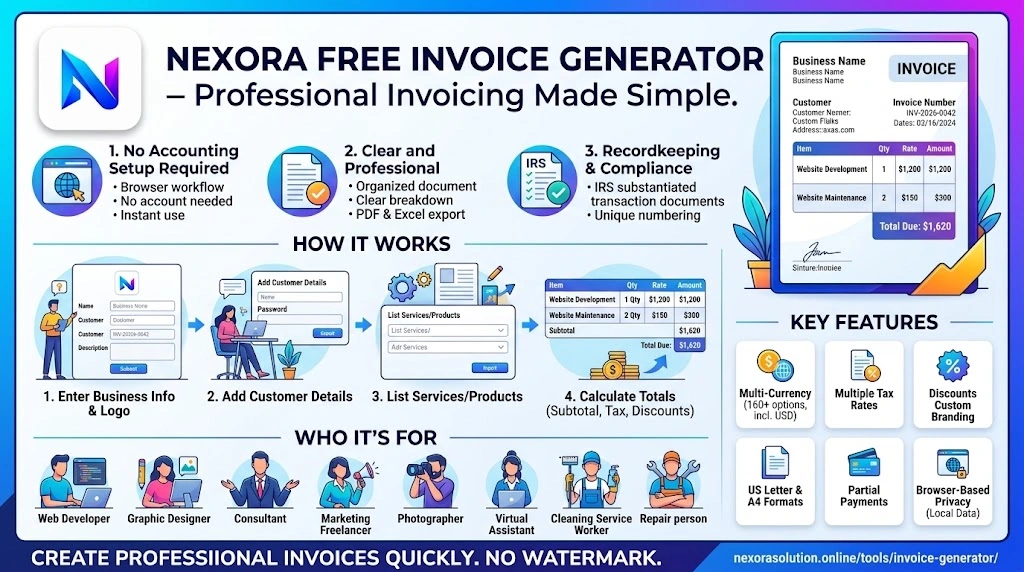
Need to invoice a U.S. client without complicated accounting software? Learn how to create a professional invoice and use a free online invoice generator for PDF or Excel invoices.
Free Invoice Generator for Small Businesses in the USA: How to Create a Professional Invoice
Sending an invoice should not require a complicated accounting setup.
For a freelancer finishing a website project, a contractor completing a job, a consultant billing a client, or a small business sending a recurring service bill, the basic requirement is simple: the customer needs a clear document showing who is billing them, what was provided, how much is due and when payment is expected.
A free invoice generator can make this process much easier. Instead of designing an invoice manually in a word processor or spreadsheet, you can enter your business and client information, add the services or products, review the totals and create a professional document.
For U.S. businesses and freelancers working with American clients, the invoice can also be prepared in U.S. dollars and formatted for US Letter paper.
Nexora's Free Invoice Generator provides this workflow directly in a browser, with PDF and Excel export and no account required.
What Is an Invoice?
An invoice is a business document used to request payment for products or services that have been provided.
A typical invoice connects several pieces of information in one place:
Who provided the product or service
Who is being billed
What was supplied
How much each item costs
Any applicable discount or tax
The total amount due
The invoice date
The payment due date
Instructions for making the payment
Invoices can also become part of a business's financial records. The IRS identifies invoices as supporting documents that businesses may use to substantiate transactions and maintain their records.
That makes a well-organized invoice useful beyond simply asking a customer to pay.
What Should a U.S. Small Business Put on an Invoice?
There is no reason to make an invoice visually complicated. The important part is making the transaction easy for the client or accounts-payable department to understand.
A practical invoice can include these sections.
- Your business information
Start with the identity of the business or person issuing the invoice.
Include information such as:
Business or professional name
Business address
Email address
Phone number, where appropriate
Website, if useful
Tax identification information when applicable
The information should match the details your client already has on file.
- Customer information
Add the client's billing details.
For a business customer, this may include the company name, billing contact, address and email address.
Getting the client's billing information right can prevent unnecessary back-and-forth after the invoice has already been sent.
- Invoice number
Every invoice should have a unique identifier.
A simple sequence such as INV-1001, INV-1002 and INV-1003 is easy to understand.
You can also use a year-based system such as INV-2026-0042.
The important point is consistency. Your numbering system should make it easy to locate the original invoice later.
- Invoice and due dates
Show the date the invoice was issued and the date payment is expected.
For example:
Invoice Date: October 2, 2026
Due Date: October 16, 2026
Terms: Net 14
Clear dates remove uncertainty from the payment process.
- Itemized services or products
Do not simply write:
Website work — $1,500
A more useful invoice might identify the actual work:
Description
Qty
Rate
Amount
Website development
1
$1,200
$1,200
Website maintenance
2
$150
$300
This gives the customer enough information to understand what they are paying for without asking you to explain every amount separately.
- Subtotal, tax and total
Show the calculation clearly.
For example:
Subtotal: $1,500
Sales Tax: $120
Total: $1,620
Whether sales tax applies depends on the transaction and the relevant state or local rules. In the United States, sales-tax rules can differ between states and local jurisdictions, so businesses should verify the applicable requirements rather than assuming one nationwide rate.
A general-purpose invoice generator can calculate the figures, but it should not be treated as a substitute for professional tax advice.
- Payment instructions
Tell the customer how they can pay.
Depending on your business, this could include:
Bank transfer information
Payment link
Business payment account
Check instructions
Other agreed payment methods
The objective is simple: after opening the invoice, the customer should know what to do next.
Why U.S. Businesses Often Benefit From a Simple PDF Invoice
PDF is useful because the document's appearance remains consistent when it is opened on another computer or attached to an email.
A freelancer can create an invoice, download the PDF and send it to the client without asking the client to edit a spreadsheet.
For businesses that still reconcile transactions in spreadsheets, an Excel version can also be useful.
Nexora's Free Invoice Generator supports both PDF and Excel output. Its Excel export creates a workbook rather than a simple CSV, allowing invoice information to remain usable in spreadsheet workflows.
Choosing USD and US Letter for U.S. Clients
When the customer is in the United States, showing the agreed amount in USD ($) can make the invoice easier for the client's finance team to process.
Paper format can matter too.
Nexora's invoice generator includes US Letter alongside A4, allowing the invoice design to match a common U.S. document format. The tool also supports more than 160 currencies for businesses working internationally.
This is especially useful for freelancers who work with clients in multiple countries but still need a familiar U.S.-style document for American customers.
How to Create an Invoice Without Accounting Software
You do not necessarily need to start with a full accounting platform just to send a professional invoice.
For a simple transaction, the workflow can be:
Step 1: Add your business details
Enter your business or professional information and add your logo if you use one.
Step 2: Add the client
Enter the customer's billing information exactly as they provided it.
Step 3: Add the work or products
Enter each service or product separately with its quantity and price.
Step 4: Check the totals
Review the subtotal, discounts, applicable taxes and final amount.
Step 5: Add payment terms
Enter the due date and the payment instructions agreed with the client.
Step 6: Choose the invoice format
For a U.S. customer, you can use USD and US Letter where appropriate.
Step 7: Download and send
Create the final document as a PDF and send it through your normal business email or other agreed communication channel.
With Nexora's Free Invoice Generator, these steps can be completed in the browser without creating an account. The tool also supports PDF, Excel and print output.
Free Invoice Generator for Freelancers
Freelancers often have a different invoicing workflow from larger companies.
You may have only a handful of clients, send invoices after completing a project and want to avoid paying for a complete accounting subscription just to produce a professional invoice.
A free invoice generator can be useful for:
Web developers billing project milestones
Graphic designers billing design work
Consultants billing hourly or fixed-fee services
Marketing freelancers billing monthly retainers
Photographers billing shoots and editing
Virtual assistants billing weekly or monthly services
Independent contractors billing completed jobs
For these users, speed matters.
The goal is not to build an entire accounting system. The goal is to produce an accurate document that the client can understand and pay.
Free Invoice Generator for Small Businesses
Small businesses can use the same approach for regular customer billing.
For example, a local service business might create invoices for:
Cleaning services
Repairs
Maintenance
Consulting
Digital services
Equipment rental
Wholesale orders
Professional services
The advantage of a browser-based tool is that the business can start with a straightforward invoice workflow and move to more advanced accounting or CRM software later when it actually needs customer databases, payment tracking, team access or financial reporting.
What Makes Nexora's Free Invoice Generator Different?
Nexora's free invoice tool is designed around a simple browser-first workflow.
The current tool includes:
No signup: You can create an invoice without registering an account.
No watermark: The generated invoice does not add a Nexora watermark.
PDF and Excel: Export the document as a PDF or an Excel workbook.
USD and 160+ currencies: Useful for U.S. businesses as well as international client work.
US Letter and A4: Choose a paper format according to your customer or workflow.
Multiple taxes: Different tax rates can be applied to different invoice lines.
Discounts and payments: The editor supports discounts and partial-payment information.
Custom branding: Add business information, logo and invoice styling.
Browser-based privacy: Nexora states that invoice information is stored locally on the user's device rather than uploaded to its servers.
You can access the tool here:
Free Invoice Generator:
https://nexorasolution.online/tools/invoice-generator/
Free Invoice Generator vs. Spreadsheet Template
Both approaches can work, but they solve the problem differently.
A spreadsheet gives you maximum flexibility, but you may need to create formulas, maintain formatting and check calculations yourself.
A dedicated invoice generator is designed specifically around invoice creation. It can handle the document structure and calculations while allowing you to concentrate on the actual transaction.
For someone who only needs a few invoices each month, a browser-based generator can be a practical starting point.
For a growing company with hundreds of invoices, customer records, recurring billing and multiple employees, a complete accounting, CRM or ERP workflow may eventually make more sense.
Keep Your Invoice Records Organized
Creating the invoice is only one part of good billing.
Businesses should also maintain organized financial records.
The IRS says businesses should keep records that clearly show income and expenses and identifies invoices, receipts and other transaction documents as supporting records. It also notes that electronic records are subject to the same basic recordkeeping requirements as paper records.
A simple workflow is to keep copies of:
Issued invoices
Paid invoices
Payment confirmations
Business expenses
Relevant contracts or agreements
The exact recordkeeping obligations depend on the business and circumstances, so businesses should use current IRS guidance and, where necessary, professional tax advice.
Common Invoice Mistakes to Avoid
A professional invoice does not need to be fancy. It needs to be understandable.
Avoid sending an invoice with no invoice number, unclear dates, missing payment instructions or a single unexplained total.
Another common problem is mixing several services into one vague line. Detailed descriptions can help the customer understand exactly what the charge represents.
Tax is another area where assumptions can create problems. U.S. sales-tax rules are not identical across all states and local jurisdictions, so do not automatically apply one rate to every customer. Check the rules applicable to your business and transaction.
Finally, proofread the invoice before sending it. An incorrect client name, amount or due date can delay payment.
Final Thoughts
A professional invoice does not have to come from expensive accounting software.
For freelancers, contractors and small businesses, a free invoice generator can provide a fast way to produce a clean document with business details, customer information, itemized charges, totals and payment terms.
For U.S. clients, using USD, a suitable paper format such as US Letter and clear payment information can make the document easier to process.
Nexora's Free Invoice Generator provides these features directly in the browser, including PDF and Excel export, no signup, no watermark and support for multiple currencies.
For occasional or straightforward billing, you can start here:
https://nexorasolution.online/tools/invoice-generator/
Related Articles
- Free Invoice Generator, Thermal Receipt Generator & Invoice on Letterhead — Nexora Free Business Tools — 1 min read
- Free Invoice Generator USA | Create Free Invoices Online — 1 min read
- How to Create an Invoice Without Accounting Software — Free Invoice Generator for Freelancers — 1 min read
- Free Invoice Generator Canada: A Practical Guide for Freelancers and Small Businesses — 1 min read