Free Invoice Generator Canada: A Practical Guide for Freelancers and Small Businesses
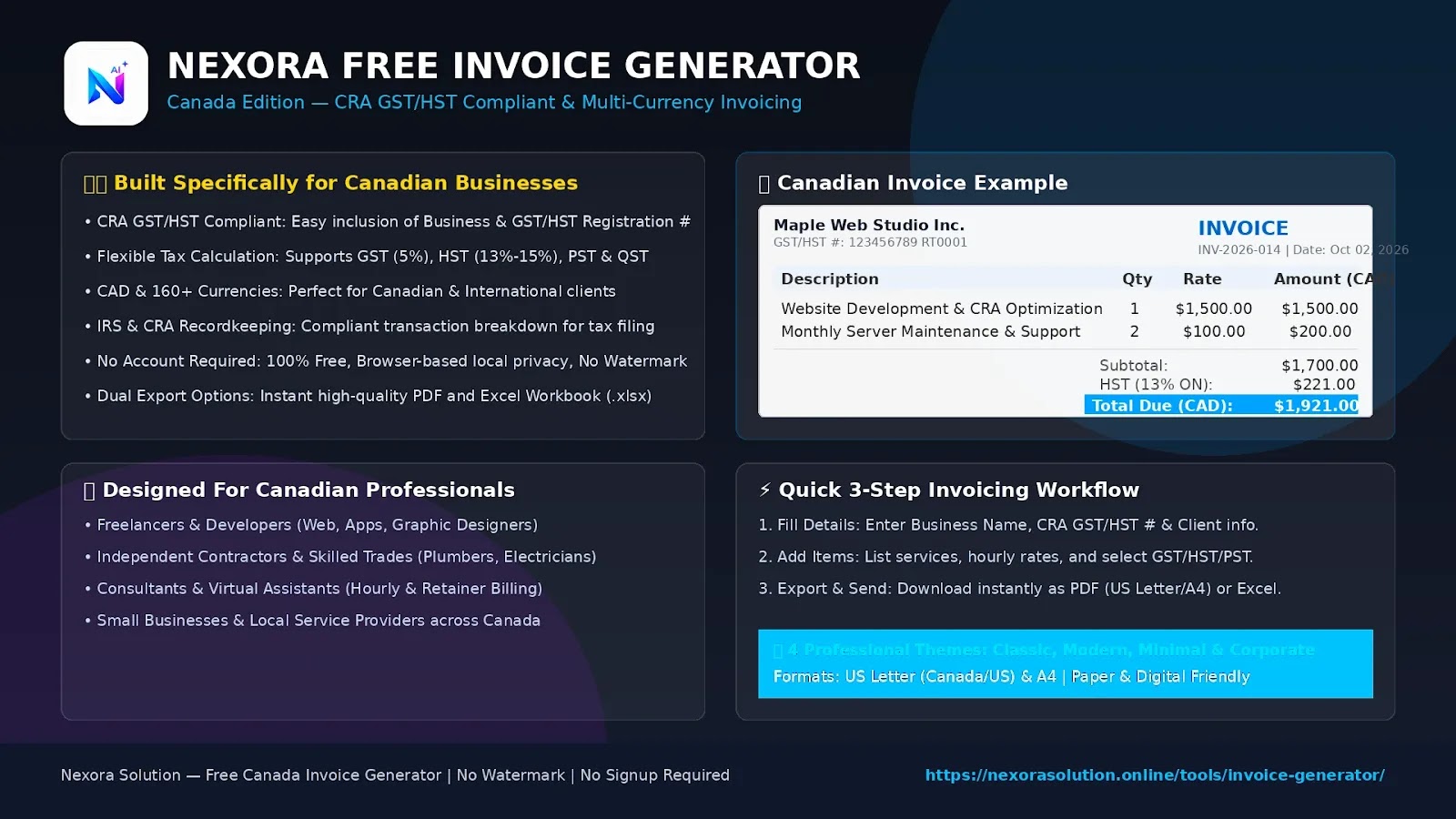
Need a simple way to bill clients in Canada? This guide explains Canadian invoice basics, GST/HST information, CAD billing, payment terms and how freelancers can create a professional PDF invoice online.
Free Invoice Generator Canada: A Practical Guide for Freelancers and Small Businesses
Getting paid is one of the most important parts of running a small business, but creating the invoice should not become a business project of its own.
For a Canadian freelancer, contractor, consultant, tradesperson or small business owner, an invoice needs to answer a few basic questions quickly:
Who provided the work?
Who is paying?
What was supplied?
How much is owed?
What taxes apply?
When should payment be made?
How should the customer pay?
A good invoice makes those details easy to find.
A free invoice generator can simplify the process by handling the document layout and calculations while you concentrate on the actual transaction.
For Canadian businesses, there is one additional consideration: GST/HST and provincial tax rules can affect how an invoice should present the amount being charged. The Canada Revenue Agency (CRA) provides specific information requirements for GST/HST registrants and their customers.
This guide explains the Canadian invoicing workflow without assuming that every freelancer needs a large accounting platform.
What Is a Canadian Invoice?
A Canadian invoice is a business document used to request payment for goods or services.
The format can be simple. It does not need to look like a complicated accounting report.
A useful invoice normally identifies:
The seller or service provider
The customer
Invoice number
Invoice date
Description of products or services
Quantity and price where applicable
Taxes where applicable
Total amount
Payment terms
Payment instructions
For GST/HST-registered businesses, additional information may be needed depending on the value and nature of the transaction. CRA's current guidance sets different information requirements for sales under $100, $100 to $499.99, and $500 or more when customers need documentation to support input tax credit claims.
That distinction is important because a generic invoice template is not automatically the right document for every Canadian transaction.
Who Can Use a Free Invoice Generator in Canada?
You do not need to run a large company to benefit from an invoice generator.
A simple online invoice tool can be useful for:
Freelancers
Web developers, designers, writers, marketers, photographers and consultants can create invoices for project work, hourly services or retainers.
Self-Employed Professionals
A self-employed person may need to send an invoice after completing a consulting assignment, repair job, design project or professional service.
This makes invoice generator for self-employed Canada a useful search intent for people who want something simpler than full accounting software.
Contractors and Tradespeople
Electricians, plumbers, painters, renovation contractors and other service businesses can use itemized invoices to separate labour, materials and other charges.
Small Businesses
Small companies can use a browser-based invoice maker for occasional billing without immediately introducing a complete accounts-receivable system.
What Information Should a Canadian Invoice Include?
The exact requirements can depend on the transaction and tax situation, but a practical invoice should make the transaction easy to understand.
- Business or Seller Details
Start with the person or business issuing the invoice.
Include the business or trading name and the contact details needed by the customer.
When GST/HST registration applies, the relevant registration information may also need to appear on invoices used for taxable supplies. CRA's invoice guidance specifically includes the supplier's business or trading name and, at applicable thresholds, the GST/HST registration number.
- Customer Details
Enter the customer's name or business name accurately.
For business clients, use the billing information supplied by their accounts-payable department.
An invoice with the wrong company name or incomplete billing details can create avoidable delays.
- Unique Invoice Number
Give every invoice its own number.
For example:
INV-2026-001
The next invoice could be:
INV-2026-002
A consistent numbering system makes it easier to locate invoices later and match them with payments.
- Invoice Date
Add the date the invoice was issued.
For GST/HST registrants, the invoice date can also matter for determining when GST/HST charged is reported and remitted. CRA states that the invoice date determines the reporting period for GST/HST charged on the invoice, whether or not payment has already been received.
- Description of the Work
Avoid vague descriptions.
Instead of:
Consulting — $1,000
you could write:
Website performance audit and optimization — 1 project — $1,000
The customer should be able to understand what the amount represents.
- Amount and Currency
Show the quantity, unit price and line total when these apply.
For a Canadian customer, CAD may be the natural currency, but Canadian businesses can also work with international customers and foreign currencies.
For that reason, a useful CAD invoice generator should not lock users into one currency.
- Taxes
Show applicable taxes clearly.
For GST/HST-registered businesses, CRA requires customers to be informed about whether GST/HST is being applied and whether it is included in the amount or added separately. CRA also specifies how GST/HST should be disclosed on invoices and receipts.
Do not assume that one tax treatment applies to every Canadian transaction.
- Payment Terms
Add a clear due date or payment term.
Examples include:
Due on receipt
Net 15
Net 30
You can also add payment instructions such as e-transfer, bank transfer or an online payment method agreed with the customer.
For GST/HST-related invoice information, CRA lists payment terms among the information required at certain transaction-value levels.
GST/HST on Canadian Invoices: What Small Businesses Should Know
GST/HST is one of the areas that makes Canadian invoicing different from simply copying a generic invoice template.
The important point is that not every small business is automatically required to register for GST/HST.
When Does a Small Business Have to Register?
For most businesses, CRA currently uses a $30,000 small-supplier threshold.
Generally, if taxable supplies do not exceed $30,000 over four consecutive calendar quarters, the business is considered a small supplier and does not have to register. If the business exceeds the threshold in a single calendar quarter, registration and charging requirements can begin with the supply that caused the business to exceed the threshold. There are also rules for exceeding the threshold across four consecutive quarters.
This is why an invoice generator should not simply add tax automatically without considering the business's registration status and the transaction.
Should GST/HST Be Shown Separately?
For taxable supplies, CRA says businesses must let customers know whether GST/HST is being applied and whether it is included in the price or added separately. The applicable GST/HST rate also needs to be communicated.
A clear layout might look like:
Subtotal: $1,000.00
GST/HST: $_
Total: $__
The exact tax treatment depends on the transaction, registration status and applicable rules.
Why Canadian Invoices Can Need More Attention Than a Basic Template
A generic Word document may give you a place for a company name, description and total.
That does not mean it automatically handles Canadian tax information correctly.
For GST/HST registrants, CRA's current guidance includes information such as the supplier's name, invoice date, total amount and, at the applicable thresholds, the GST/HST amount or rate, registration number, buyer information, description and payment terms.
The practical lesson is simple: the invoice should be designed around the transaction, not just around appearance.
Free Invoice Generator Canada: What to Look For
There are many invoice templates online, but not all invoice tools solve the same problem.
Before choosing a free invoice generator, check these areas.
CAD and Multiple Currency Support
Canadian businesses may invoice local customers in CAD and international customers in USD, EUR or another currency.
Nexora's invoice generator supports more than 160 currencies and handles currency-specific number formatting.
This makes the same tool useful for a Canadian freelancer who works with both local and overseas clients.
Tax Flexibility
Canadian businesses can encounter different tax situations.
Nexora's generator allows multiple taxes and lets users choose which taxes apply to individual invoice lines.
That flexibility is useful when a transaction cannot be represented accurately with one generic tax field.
However, the software should not replace checking the applicable CRA or provincial rules.
PDF Export
A PDF invoice is practical when a customer needs a final document rather than an editable spreadsheet.
Nexora generates PDF invoices directly in the browser and also provides Excel export.
No-Signup Workflow
For someone who sends only a few invoices, creating an account just to produce one PDF can add unnecessary friction.
Nexora's current invoice generator does not require an email address or password and keeps the invoice in the browser on the user's device.
Professional Templates
A professional invoice does not have to be visually complicated.
The important information should be easy to scan.
Nexora currently offers four invoice designs — Classic, Modern, Minimal and Corporate — with customizable accent colours, plus a narrow receipt layout.
How to Create a Canadian Invoice Online
A simple workflow can take only a few minutes.
Step 1: Enter Your Business Information
Add your business name, address, contact details and relevant tax information.
Step 2: Add Your Client
Enter the client or business being billed.
Make sure the name matches the customer's billing records.
Step 3: Add Your Services or Products
Create individual line items instead of combining unrelated work into one vague charge.
Step 4: Review Taxes
Add only the taxes that apply to the transaction.
For GST/HST questions, check current CRA guidance or speak with a qualified tax professional.
Step 5: Add Payment Terms
Choose a due date and explain how the client should pay.
Step 6: Check the Invoice
Review:
Customer name
Invoice number
Invoice date
Description
Quantity
Price
Tax
Total
Due date
Payment instructions
Step 7: Download the Final Invoice
Save the finished document as a PDF or use another format that fits your recordkeeping workflow.
Example: Canadian Freelancer Invoice
Imagine a freelance web developer in Ontario completes a $1,500 website project.
The invoice could contain:
Business: Maple Web Studio
Invoice: INV-2026-014
Client: Northstar Consulting Inc.
Description: Website development
Project fee: $1,500
Applicable tax: Shown according to the business's tax situation
Due date: October 16, 2026
Payment: E-transfer or bank payment
The important part is not the visual design.
The important part is that the client can immediately identify the work, amount, applicable tax treatment and payment deadline.
Example: Canadian Contractor Invoice
A contractor may have a more detailed invoice.
For example:
Item
Quantity
Rate
Amount
Labour
12 hours
$75
$900
Materials
1
$350
$350
Service call
1
$100
$100
Subtotal
$1,350
The applicable tax and final total can then be presented separately.
For contractors, itemization is particularly useful because the customer can see the difference between labour, materials and other charges.
Free Invoice PDF Canada: Why PDF Is Useful
A PDF is often a good final format because the customer receives a fixed document rather than an editable spreadsheet.
It can be:
Attached to email
Printed
Stored with business records
Sent through messaging apps
Opened on desktop or mobile devices
Nexora's generator creates PDFs with selectable text and uses the paper size chosen by the user. It supports both A4 and US Letter.
For Canadian businesses, the ability to choose a different page format can also be useful when dealing with customers outside Canada.
Invoice Template vs. Invoice Generator
A template and a generator may look similar, but the workflow is different.
A template usually gives you a document structure that you fill manually.
An invoice generator can calculate totals, apply taxes, format currencies and produce the final document for you.
A spreadsheet can still be useful for businesses that need a custom bookkeeping workflow. But when the goal is simply to create and send a professional invoice, a dedicated invoice generator may be faster.
Do You Need Full Accounting Software to Send an Invoice?
Not necessarily.
A self-employed professional who sends several invoices each month may only need:
A clear invoice
An organized way to store records
A method of receiving payment
A way to track what has been paid
As the business grows, additional needs may appear, such as recurring billing, customer management, accounts receivable, payment reconciliation and financial reporting.
That is when a full accounting or business-management system can become more appropriate.
The important point is not to start with more software than the business actually needs.
Related Articles
- How to Create an Invoice Without Accounting Software — Free Invoice Generator for Freelancers — 1 min read
- Free Invoice Generator USA | Create Free Invoices Online — 1 min read
- Free Invoice Generator for Small Businesses in the USA: How to Create a Professional Invoice — 1 min read
- Free Invoice Generator, Thermal Receipt Generator & Invoice on Letterhead — Nexora Free Business Tools — 1 min read