Pharmacy POS Software in Pakistan: Complete Guide to Billing, Inventory & Expiry Management
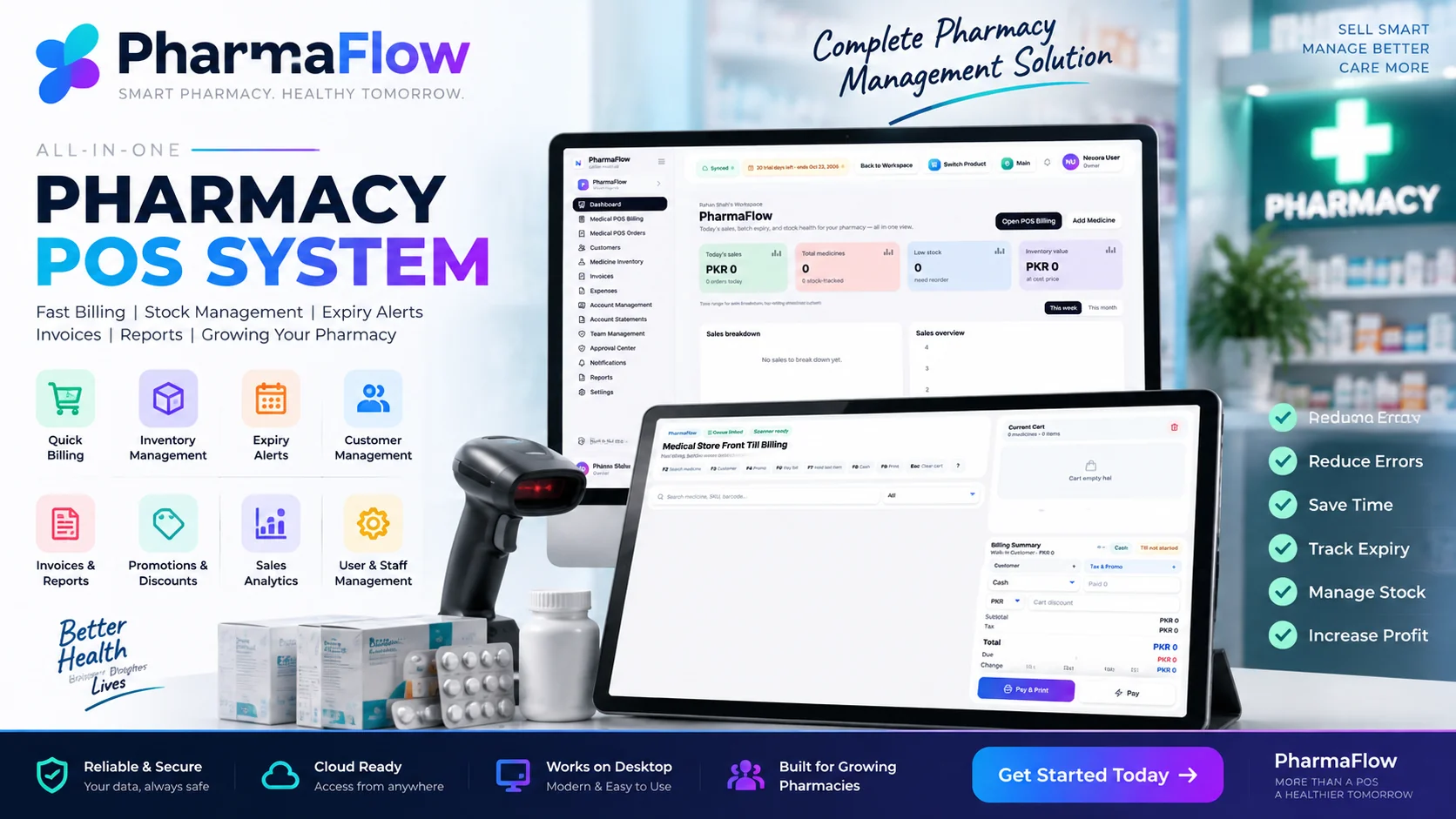
Pharmacies and medical stores need more than simple billing software. PharmaFlow brings medicine billing, inventory management, batch-aware stock handling, customer management, invoices, expenses and reporting into one place. Built for pharmacies of every size.
Pharmacy POS Software in Pakistan: How Modern Medical Stores Can Manage Billing, Inventory and Expiry
Pharmacy POS Software in Pakistan: How Modern Medical Stores Can Manage Billing, Inventory and Expiry
Running a pharmacy or medical store involves much more than selling medicines at the counter. Store owners need to manage billing, medicine inventory, stock movement, invoices, customer records, expenses and daily sales while keeping an accurate view of what is available in the store.
A modern pharmacy POS system brings these operations into one connected workflow. Instead of managing billing separately from inventory and business records, pharmacy owners can use a centralized system to make everyday operations faster and easier to monitor.
PharmaFlow is designed as a modern pharmacy POS and medical store software solution that combines front-till billing with medicine inventory and business management features.
What Is Pharmacy POS Software?
Pharmacy POS software is a point-of-sale system designed specifically for pharmacies and medical stores. It manages the process of selling products, recording transactions and maintaining business information while providing tools for inventory and reporting.
A pharmacy-focused POS system needs to handle more than a traditional retail checkout. Medicines require organized inventory records, accurate product information and better control over stock movement.
For a medical store, the POS can become the central point where billing, inventory, invoices, customers and reports connect.
Why Pharmacies Need More Than Basic Billing
A basic billing application may be enough to create a receipt, but pharmacy operations usually involve many additional tasks.
A store owner may need to know which medicines are available, which products are running low, what sales were generated during a specific period, which customers were involved in transactions and how much inventory is held by the business.
When these records are maintained separately, staff may spend more time entering or checking the same information in different places.
A connected pharmacy POS workflow can reduce this fragmentation by keeping important operational data inside one system.
PharmaFlow Medical Store POS Billing
PharmaFlow includes a dedicated Medical Store Front Till Billing workflow designed for fast counter operations.
The billing screen provides medicine search using information such as medicine name, SKU or barcode, while the cart and billing summary provide a straightforward process for adding items, handling payment and completing the transaction.
The interface also includes quick keyboard shortcuts for common till actions, helping staff move through repetitive billing tasks more efficiently.
This type of workflow is especially useful in busy medical stores where speed and accuracy at the counter are important.
Medicine Inventory Management
Inventory is one of the most important parts of pharmacy operations.
PharmaFlow includes a dedicated Medicine Inventory area where store owners can manage medicine records and monitor stock-related information.
The dashboard also provides an overview of total medicines, low-stock items and inventory value, giving the owner a centralized view of the current inventory position.
Having this information available alongside sales data can make it easier to identify stock that may require attention.
Batch and Expiry-Aware Stock Management
Medicine inventory requires additional attention because products may be associated with different batches and expiry dates.
A pharmacy POS should therefore make stock information easier to track and organize rather than treating every item like a simple retail product.
PharmaFlow is designed around batch-aware stock handling so that pharmacy inventory can be managed with greater visibility.
This can help medical-store operators keep their stock records more organized and make inventory management part of the regular sales workflow.
Billing, Invoices and Orders
PharmaFlow separates Medical POS Orders from invoices within its pharmacy workflow.
The system also includes dedicated areas for invoices and financial records, helping businesses keep transaction information organized instead of relying only on the front billing screen.
For a growing pharmacy, this separation can provide a clearer view of day-to-day transactions and business records.
Customer Management
Pharmacies may serve a large number of repeat customers, making customer records an important part of a modern POS system.
PharmaFlow includes a Customers section and allows customer information to be associated with the billing workflow.
This can help stores keep customer-related transaction information more organized and provide a more structured checkout experience.
Expenses and Account Management
Running a medical store also involves operational expenses and financial record keeping beyond sales.
PharmaFlow includes Expenses, Account Management and Account Statements sections within the workspace.
These areas provide a broader business-management layer around the core pharmacy POS rather than limiting the software to billing alone.
Sales Reports and Business Visibility
A pharmacy owner needs to understand what is happening in the business, not simply process transactions.
PharmaFlow provides Reports along with dashboard summaries for sales, medicines, low-stock items and inventory value.
The dashboard also includes sales breakdown and sales overview areas, giving the business a central place to review operational information.
Better visibility can help owners move from simply recording transactions to actively monitoring the performance of their medical store.
Team Management and Approvals
As a pharmacy grows, multiple employees may become involved in daily operations.
PharmaFlow includes Team Management, Approval Center and Notifications features within the workspace.
These features provide a foundation for managing staff access and operational workflows as the business becomes more structured.
Why Pharmacy POS Software Matters for Modern Medical Stores
The biggest advantage of a pharmacy POS system is not simply faster billing.
The real value comes from connecting different parts of the business.
A store owner can move from a counter transaction to inventory information, invoices, customers, expenses and reports without relying on multiple disconnected systems.
This creates a more centralized workflow for everyday pharmacy operations.
Who Can Use Pharmacy POS Software?
A pharmacy POS system can be useful for different types of medicine retailers, including:
- Independent pharmacies
- Medical stores
- Retail medicine shops
- Small and growing pharmacy businesses
- Pharmacies looking to replace manual billing and inventory processes
The ideal setup depends on the size of the business, its workflow and the level of inventory and reporting control required.
What Should You Look for in Pharmacy POS Software?
Before selecting a pharmacy POS system, pharmacy owners should look beyond the billing screen.
Important areas to evaluate include:
- Fast medicine search and billing
- Barcode support
- Medicine inventory management
- Batch-aware stock handling
- Expiry-related inventory visibility
- Customer management
- Invoices and transaction records
- Expense management
- Sales reports
- Staff and team controls
- Business dashboards
- Easy-to-use interface
The right system should fit the pharmacy's actual daily workflow instead of forcing staff to maintain separate records for every operation.
PharmaFlow for Pharmacy and Medical Store Management
PharmaFlow combines pharmacy billing and medical-store management into one software workspace.
Its dashboard brings sales, medicine counts, low-stock information and inventory value together, while the broader workspace includes billing, orders, customers, medicine inventory, invoices, expenses, account management, statements, team management, approvals, notifications and reports.
For pharmacy owners, this creates a single operational environment for managing day-to-day store activities.
Conclusion
Pharmacy POS software is becoming an important part of modern medical-store management because pharmacy businesses need more than simple checkout functionality.
Billing, medicine inventory, batch-aware stock handling, customers, invoices, expenses and reporting all contribute to the daily operation of a pharmacy.
PharmaFlow brings these functions together through a dedicated pharmacy POS and medical-store management workflow, giving businesses a centralized system for managing their everyday operations.
For pharmacies evaluating a new software solution, the key is to choose a system that can support both fast counter billing and the wider operational needs of the business.
Frequently Asked Questions
What is pharmacy POS software?
Pharmacy POS software is a system designed to manage pharmacy and medical-store billing, medicine inventory, customers, invoices, payments and business reporting from one platform.
What is the difference between pharmacy POS software and normal retail POS software?
Pharmacy POS software is designed around medicine-store workflows and can provide features such as medicine inventory management, batch-aware stock handling, customer records and pharmacy-specific billing.
Why do pharmacies need inventory management software?
Pharmacy inventory software helps stores organize medicine records, monitor stock levels and connect inventory information with daily sales and billing operations.
Can PharmaFlow be used for a medical store?
Yes. PharmaFlow includes a dedicated Medical Store Front Till Billing workflow along with medicine inventory, customers, invoices, expenses and reporting features.
Does PharmaFlow support medicine inventory management?
Yes. PharmaFlow includes a dedicated Medicine Inventory section and dashboard information for total medicines, low-stock items and inventory value.
Does PharmaFlow support batch-aware pharmacy stock management?
PharmaFlow is designed for batch-aware stock handling so pharmacy businesses can manage medicine inventory with better visibility.
Can pharmacy staff search medicines during billing?
Yes. The Medical Store Front Till Billing screen provides medicine search using medicine name, SKU or barcode.
Does PharmaFlow include pharmacy reports?
Yes. PharmaFlow includes dashboard sales information and a dedicated Reports section for business and operational visibility.
Can pharmacies manage customers in PharmaFlow?
Yes. PharmaFlow includes a Customers section and customer-related options within the billing workflow.
Can a pharmacy manage expenses and account records?
Yes. PharmaFlow includes Expenses, Account Management and Account Statements sections within the workspace.
Related Articles
- Pharmacy Management Software in Pakistan: Complete Guide — 1 min read
- Pharmacy POS Software in Pakistan: Complete Guide for Medical Stores — 1 min read
- Pharmacy Batch & Expiry Management — 1 min read
- Free Invoice Generator USA | Create Free Invoices Online — 1 min read